A magical violin player in a forest
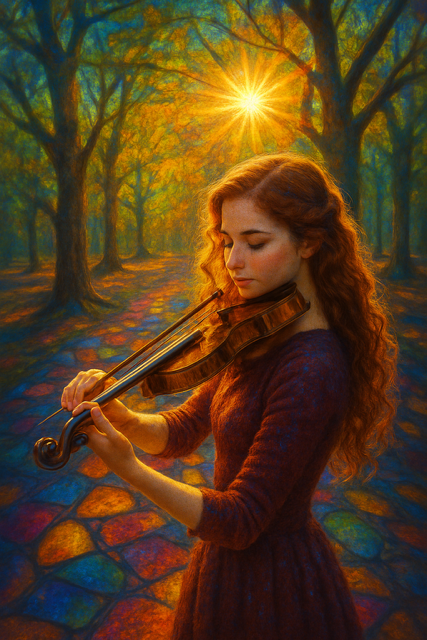
The image shows a young woman playing the violin in a glowing forest, surrounded by rich autumn colours and dappled light. Warm golden sunlight streams through tall trees, creating a magical, almost dreamlike atmosphere. The ground appears like stained glass, reflecting blues, oranges, and reds that echo the forest canopy above.
What makes this image so pleasing is the balance between realism and fantasy. The violin and the figure feel believable and detailed, while the colours, light, and environment lean into a painterly, storybook world. The soft lighting, shallow focus, and calm expression of the subject give the image an emotional quality — peaceful, reflective, and slightly magical.
This is a great example of how clear prompt structure can guide AI to create artwork that feels intentional rather than random.
How to Build This AI Art Prompt from Scratch
When creating AI art, it’s best to build your prompt in layers. This helps the AI understand what you want, where it happens, and how it should look.
We’ll use this simple structure:
[Subject] + [Setting] + [Style] + [Colours / Lighting] + [Textures / Details] + [Camera / Mood (optional)]
Let’s build it step by step.
[Refer to my full AI art prompt guide for a full description of how to build up perfect prompts for creating brilliant AI art: https://techandai.org/how-to-write-ai-art-prompts-for-beginners-the-complete-guide/]
1. Subject – Who or What Is the Main Focus?
Start by clearly describing the main subject. Keep it simple and specific.
Example:
A young woman with long red hair playing a violin
This tells the AI exactly who should be in the image and what they are doing.
You can add gentle detail, but don’t overdo it yet.
2. Setting – Where Is the Scene?
Next, place your subject into an environment.
Example:
A young woman with long red hair playing a violin, standing in a forest
Already, the image is becoming more visual. The AI now understands context.
3. Style – What Kind of Art Should This Be?
Style is one of the most important parts of an AI art prompt. This image leans toward painterly realism with a fantasy feel.
Example:
Painterly fantasy illustration, soft realism, fine art digital painting
This guides the AI away from flat or cartoon styles and toward a rich, artistic look.
4. Colours / Lighting – How Should It Feel?
This image is all about warm light and vibrant colour.
Example:
Warm golden sunlight filtering through trees, rich autumn colours, glowing highlights
This tells the AI how to light the scene and what emotional tone the colours should create.
5. Textures / Details – What Makes It Special?
Here’s where you add the magic. These details elevate the image from “nice” to “wow”.
Example:
Soft brushstroke texture, glowing light particles, stained-glass-like reflections on the forest floor, detailed violin wood grain
Details like this encourage depth, richness, and visual interest.
6. Camera / Mood (Optional) – How Is It Viewed?
This step is optional but powerful. It controls how the viewer experiences the scene.
Example:
Shallow depth of field, soft focus background, peaceful and emotional mood
This helps the AI create intimacy and atmosphere.
The Full Combined Prompt Example
Here’s how everything looks when it’s put together:
A young woman with long red hair playing a violin, standing in a forest. Painterly fantasy illustration, soft realism, fine art digital painting. Warm golden sunlight filtering through trees, rich autumn colours, glowing highlights. Soft brushstroke texture, glowing light particles, stained-glass-like reflections on the forest floor, detailed violin wood grain. Shallow depth of field, soft focus background, peaceful and emotional mood.
This structured approach is repeatable and works for almost any type of AI art.
Why Your Image Might Look Different (And That’s Okay)
AI does not create the exact same image every time — even with the same prompt. This happens because:
- AI uses random seeds to introduce variation
- Small differences in interpretation create new results
- Models prioritise creativity, not duplication
Think of AI like a creative collaborator rather than a photocopier.
If your image looks different:
- That’s normal
- That’s expected
- That’s part of the fun
Experiment, Adjust, and Make It Yours
Try changing:
- Subject (violin → cello, woman → child, musician → dancer)
- Setting (forest → cathedral, city street, misty meadow)
- Style (oil painting, impressionist, Ghibli-inspired, cinematic realism)
- Colours (cool blues, moonlight, pastel tones, dramatic shadows)
- Mood (joyful, melancholic, mysterious, magical)
There are no wrong answers — only new creative directions.
Final Thoughts: Play, Explore, Create
Learning AI art isn’t about getting the perfect image on the first try. It’s about experimenting, adjusting, and discovering what excites you visually.
Use this prompt structure as your foundation, then bend it, break it, and make it your own.
Most importantly — have fun creating ✨
Instagram: https://instagram.com/Tech__and__ai