Image Description: What Are We Looking At?
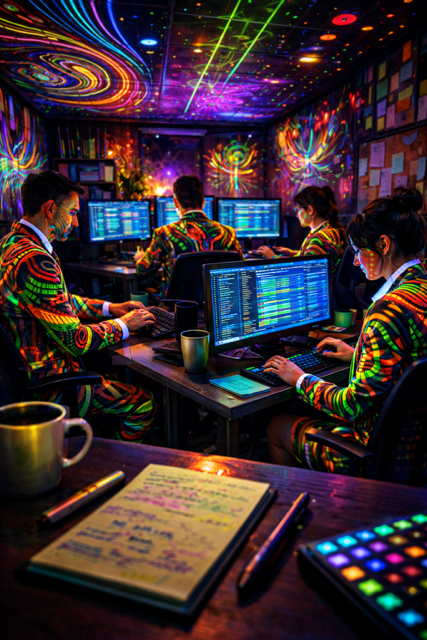
The image above shows a dark, modern office filled with people working at computers, but with a striking twist: everything is covered in glowing neon art.
The workers are wearing suits that glow with psychedelic patterns, the walls and ceiling are alive with swirling neon designs, and even the computer screens shine with vibrant colour. The scene feels futuristic, creative, and immersive, like a crossover between a tech startup and a digital art installation.
What makes this image especially pleasing is:
- The contrast between dark surroundings and bright neon colours
- The strong 3D depth, making the scene feel realistic and believable
- The repetition of patterns across people, walls, and screens, which creates visual harmony
- The cinematic camera angle that places us inside the scene rather than looking at it from afar
This is a great example of how AI art can combine real-world subjects with bold artistic styling.
How to Build This AI Art Prompt From Scratch
When creating AI art, it’s best to build your prompt in clear layers. We’ll use this simple structure:
[Subject] + [Setting] + [Style] + [Colours / Lighting] + [Textures / Details] + [Camera / Mood (optional)]
[Refer to my complete AI art prompt guide for a full description of how to build up perfect prompts for creating brilliant AI art: https://techandai.org/how-to-write-ai-art-prompts-for-beginners-the-complete-guide/]
Let’s go through each part step by step.
1. Subject – What Is the Main Focus?
Start by clearly describing who or what is in the image.
Example Subject Prompt:
A group of office workers sitting at desks, working at computers, wearing smart business suits
This tells the AI exactly what it needs to include. Keep this part simple and factual.
2. Setting – Where Is the Scene?
Next, describe the environment and surroundings.
Example Setting Prompt:
Inside a small, dark office space with multiple desks, monitors, walls and ceiling visible, viewed from desk height
This places the subject in a believable, physical space and helps the AI build depth.
3. Style – The Artistic Direction
This is where the image becomes exciting. The style tells the AI how the picture should look.
Example Style Prompt:
Futuristic neon art style, psychedelic digital art, cyberpunk-inspired, hyper-realistic 3D render
You can mix styles like this to get a more unique result.
4. Colours / Lighting – The Visual Impact
Colour and lighting are crucial for mood and atmosphere.
Example Colours / Lighting Prompt:
Neon green and orange as main colours, with accents of blue and red, glowing neon lighting, dark background, high contrast, illuminated patterns
This explains both the palette and how the light behaves.
5. Textures / Details – Making It Feel Real
This section adds realism and richness.
Example Textures / Details Prompt:
Highly detailed neon patterns projected onto walls, ceiling, clothing and faces, glowing computer screens with neon interfaces, realistic reflections, lifelike materials, strong depth and dimensionality
Details like reflections and materials help the image feel 3D and believable.
6. Camera / Mood (Optional) – Finishing Touches
This final part controls how the image is viewed and how it feels emotionally.
Example Camera / Mood Prompt:
Cinematic perspective from the surface of a desk, shallow depth of field, immersive viewpoint, futuristic, creative, intense but focused mood
This makes the viewer feel like they are sitting inside the office.
The Full Combined Prompt Example
Here’s how it all looks when combined into one complete prompt:
A group of office workers sitting at desks, working at computers, wearing smart business suits, inside a small dark office space with multiple desks, monitors, walls and ceiling visible, viewed from desk height. Futuristic neon art style, psychedelic digital art, cyberpunk-inspired, hyper-realistic 3D render. Neon green and orange as main colours with accents of blue and red, glowing neon lighting, dark background, high contrast. Highly detailed neon patterns projected onto walls, ceiling, clothing and faces, glowing computer screens with neon interfaces, realistic reflections, lifelike materials, strong depth and dimensionality. Cinematic perspective from the surface of a desk, immersive viewpoint, futuristic and creative mood.
You can paste this into your AI image generator and tweak it to your taste.
Why Your Image Might Look Different (And That’s OK)
AI never creates the exact same image twice. Even if you use the same prompt, small changes happen because:
- AI uses randomness to generate details
- Lighting, composition, and faces are re-imagined each time
- Different models interpret prompts slightly differently
This isn’t a flaw — it’s a feature. It means every image you create is unique.
How to Experiment and Make It Your Own
Have fun adjusting parts of the prompt:
- Change colours (try pink and cyan instead of green and orange)
- Switch style (abstract neon, anime neon, minimalist neon)
- Adjust camera angle (top-down, wide angle, close-up)
- Increase or reduce realism
- Add new elements (plants, coffee cups, holograms, windows)
Small changes can completely transform the final image.
Final Tip: Play, Explore, and Create
AI art is about experimentation, not perfection. Start simple, build your prompts step by step, and enjoy seeing how your ideas come to life. The more you play, the better you’ll understand how prompts shape your images.
Happy creating 🚀
Instagram: https://instagram.com/Tech__and__ai