Image Description: What Are We Looking At?
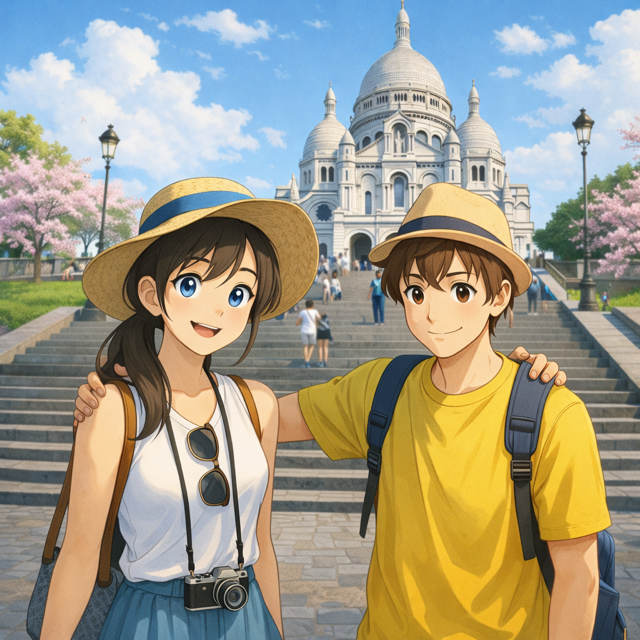
The image shows a happy young couple on holiday in Paris, standing on the famous steps leading up to Sacré-Cœur Basilica in Montmartre. They are dressed casually for sightseeing, wearing summer clothes and hats, with backpacks and a camera, giving the scene a relaxed travel-photography feel.
What makes this image particularly pleasing is:
- The clean anime-inspired art style that feels friendly and accessible
- The clear focal point (the couple) with a well-known landmark in the background
- The bright, natural colours and soft lighting, which create a cheerful, warm mood
- The sense of story — it feels like a snapshot from a real holiday moment
This kind of image is perfect for beginners because it shows how AI can combine people, place, style, and emotion into one cohesive scene.
How AI Art Prompts Work (Simple Explanation)
When creating AI art, you don’t need to write one long complicated sentence. Instead, it helps to build your prompt step by step, using clear sections.
We’ll use this simple structure:
[Subject] + [Setting] + [Style] + [Colours / Lighting] + [Textures / Details] + [Camera / Mood (optional)]
Let’s build the prompt together from scratch.
[Refer to my complete AI art prompt guide for a full description of how to build up perfect prompts for creating brilliant AI art: https://techandai.org/how-to-write-ai-art-prompts-for-beginners-the-complete-guide/]
Step 1: Subject – Who or What Is in the Image?
Start with the main focus of the image.
In this picture, the subject is:
- Two young people
- A couple
- Tourists on holiday
Example Subject Prompt:
A smiling young couple on holiday, a man and a woman wearing casual summer clothes, backpacks, and sun hats
At this stage, keep it simple. We’ll add personality and detail later.
Step 2: Setting – Where Is the Scene?
Next, describe where the image takes place.
This image is set:
- In Paris
- At Montmartre
- On the steps leading up to Sacré-Cœur Basilica
Example Setting Prompt:
Standing on the steps of Sacré-Cœur Basilica in Montmartre, Paris, with the church visible in the background and people walking up the steps
This helps the AI place your subjects in a believable, recognisable location.
Step 3: Style – What Artistic Look Do You Want?
Style is one of the most important parts of AI art.
This image uses:
- Anime-inspired illustration
- Clean lines
- Soft, friendly character design
Example Style Prompt:
Anime-style illustration, modern Japanese animation look, clean line art, soft character proportions, detailed but friendly design
If you changed only this section, you could turn the same scene into realism, watercolour, oil painting, or 3D.
Step 4: Colours / Lighting – How Does It Feel Visually?
Now describe the colour palette and light.
This image feels:
- Bright and sunny
- Warm
- Natural daylight
Example Colours / Lighting Prompt:
Bright natural daylight, soft sunlight, blue sky with light clouds, warm and cheerful colour palette, vibrant but balanced tones
Lighting strongly affects mood, so this section is powerful.
Step 5: Textures / Details – What Makes It Feel Finished?
Here we add the small details that make the image feel polished and complete.
In this image:
- Clothing looks soft and natural
- The stone steps are detailed
- The background has depth and realism
Example Textures / Details Prompt:
Smooth skin shading, soft fabric textures on clothing, detailed stone steps, subtle background depth, gentle facial expressions, clean and polished finish
These details help avoid flat or unfinished results.
Step 6: Camera / Mood (Optional) – How Is the Scene Captured?
This final section is optional but adds a professional touch.
This image feels like:
- A travel photo
- Taken at eye level
- Friendly and relaxed
Example Camera / Mood Prompt:
Eye-level view, medium shot, shallow depth of field, relaxed travel photography mood, happy and welcoming atmosphere
Full Example Prompt (Put It All Together)
Here’s how everything looks when combined into one prompt:
A smiling young couple on holiday, a man and a woman wearing casual summer clothes, backpacks, and sun hats, standing on the steps of Sacré-Cœur Basilica in Montmartre, Paris, with the church visible in the background and people walking up the steps. Anime-style illustration, modern Japanese animation look, clean line art, soft character proportions. Bright natural daylight, soft sunlight, blue sky with light clouds, warm and cheerful colour palette. Smooth skin shading, soft fabric textures, detailed stone steps, subtle background depth, clean polished finish. Eye-level view, medium shot, relaxed travel photography mood, happy and friendly atmosphere.
Why Your Image Might Look Different (And That’s Normal)
AI does not recreate the same image every time, even with the same prompt.
This happens because:
- AI uses randomness to stay creative
- Each generation makes slightly different choices
- Small wording changes can shift results
This is not a mistake — it’s part of the magic.
Have Fun Experimenting 🎨
Try changing:
- Style (watercolour, realistic, 3D, sketch)
- Lighting (sunset, golden hour, overcast)
- Mood (romantic, cinematic, playful)
- Camera angle (wide shot, close-up, tilt-shift)
There is no “wrong” result — every image teaches you something new.
The best way to learn AI art is to play, experiment, and enjoy the process.
Instagram: https://instagram.com/Tech__and__ai